

TL;DR:
- Getting payroll wrong can lead to HMRC penalties, hinder R&D tax credit claims, and alarm investors with non-compliance. For startups, proper setup—including registration, record-keeping, and using recognized payroll software—is essential to maintain credibility and support growth. Accurate payroll processing and proactive compliance build investor trust, facilitate funding, and establish a responsible business foundation.
Getting payroll wrong is one of the fastest ways to trigger HMRC penalties, stall an R&D tax credit claim, or raise a red flag during investor due diligence. For tech and fintech founders, the stakes are particularly high because your funding eligibility and credibility with early-stage investors often hinges on clean, compliant financial records. This guide walks you through every stage of UK payroll setup, from foundational preparation through to 2026 rule changes, so you can build a payroll process that protects your business and supports your growth ambitions.
Table of Contents
- What you need before setting up payroll
- Registering as an employer and understanding HMRC PAYE
- Choosing payroll software and tools
- Step-by-step: processing payroll and maintaining compliance
- Common pitfalls and troubleshooting tips
- Why founders should obsess over payroll—beyond compliance
- Need expert help or a smarter payroll solution?
- Frequently asked questions
Key Takeaways
PointDetailsRegister with HMRC earlyStart your payroll setup as soon as you pay directors, staff, or provide benefits to avoid penalties.Choose compliant softwareUse HMRC-recognised payroll software or an outsourced service for accurate reporting every pay period.Stay current with 2026 rulesFollow annual changes such as day-one SSP and calculation methods to stay compliant and avoid costly mistakes.Maintain recordsAlways keep PAYE, payroll, and statutory payment records for three years for HMRC inspections.Outsource for focusDelegating payroll lets founders focus on growth, innovation, and maximising tax reliefs.
What you need before setting up payroll
With the stakes established, let’s make sure you’ve ticked the right foundational boxes before even opening payroll software.
Before you register for Pay As You Earn (PAYE) or choose a payroll tool, your business needs to be properly constituted. That means you should have already completed setting up a UK company with Companies House and opened a dedicated business bank account. These aren’t optional extras. HMRC expects a registered company with a valid Unique Taxpayer Reference (UTR) before they’ll process your employer registration.
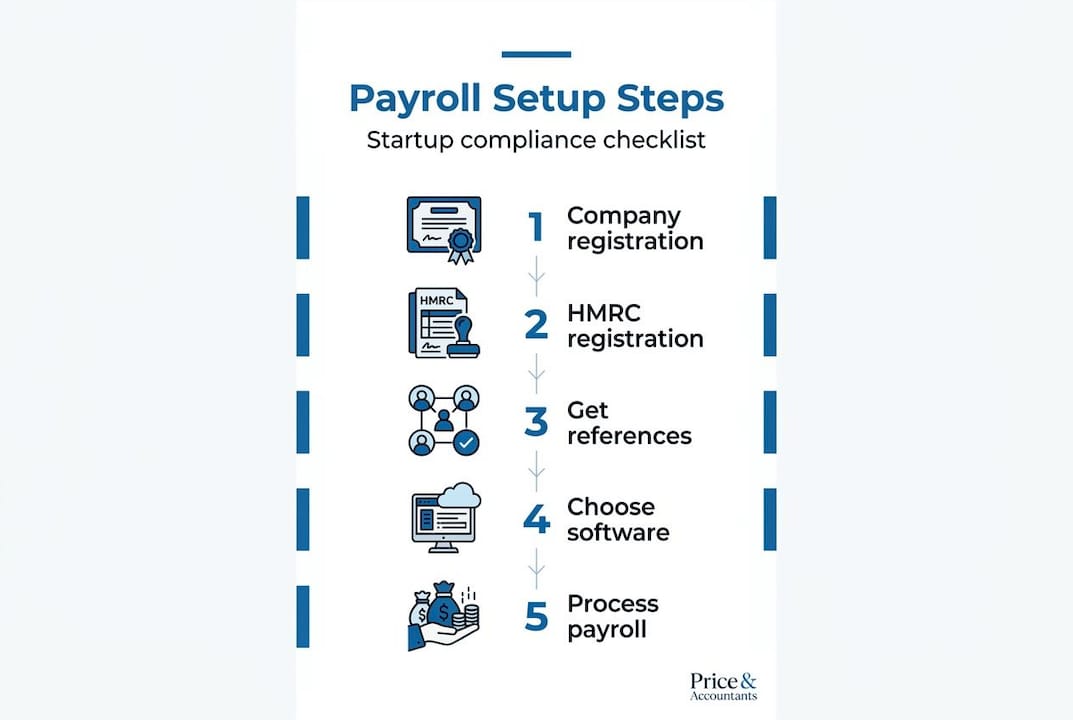
A trigger that many founders overlook is this: directors must register and operate PAYE even when paying themselves through a limited company or providing benefits and expenses. You don’t need a team of ten before payroll becomes relevant. A single director drawing a salary or receiving a company mobile phone is enough to create the obligation.
Information you’ll need to gather before registering:
- Your company registration number from Companies House
- Your UTR issued by HMRC after incorporation
- National Insurance (NI) numbers for all directors and employees
- Employee starter information, including P45s from previous employers where available
- Addresses, dates of birth, and employment contracts for all staff
- Details of any benefits or expenses you intend to provide
Once registered, HMRC issues two critical references you’ll need for every payroll submission: your Employer Reference Number (ERN) and your PAYE Accounts Office Reference. Store these securely. They’re required in every Full Payment Submission (FPS) and any correspondence with HMRC about your payroll.
Document or referenceWhy you need itWhen you get itEmployer Reference Number (ERN)Required on all payroll submissionsAfter HMRC registrationAccounts Office ReferenceUsed for PAYE payments to HMRCAfter HMRC registrationUTRRequired for company tax returnsAfter Companies House registrationEmployee NI numbersTo calculate NI deductions correctlyBefore first payroll run
Pro Tip: Review your Ltd company accounts structure before registering for payroll. How you’ve set up your share classes and director remuneration will directly influence how you operate PAYE from day one.
Registering as an employer and understanding HMRC PAYE
Once your startup is ready and has qualifying triggers, the next essential step is your registration with HMRC.
The HMRC PAYE registration process starts online and typically takes up to five working days to process, though it can occasionally take longer. Don’t leave this until the day before your first payroll run. Register as soon as you know you’ll be taking on employees or paying yourself a director’s salary.
Step-by-step employer registration process:
- Go to the HMRC website and navigate to “Register as an employer.”
- Sign in or create a Government Gateway account for your business.
- Enter your company details, including your UTR and Companies House number.
- Provide the expected first pay date and the number of employees.
- Receive your ERN and Accounts Office Reference by post, usually within five working days.
- Set up PAYE Online within your Business Tax Account to access reporting tools.
- Enrol for payroll reporting so you can submit FPS electronically.
Submitting a Full Payment Submission (FPS) is mandatory on or before every payday. This single requirement means you cannot treat payroll reporting as an occasional task. Every time money moves to an employee, HMRC must know about it in advance or on the day.
You are also legally obliged to keep records of all payroll information for a minimum of three years. This includes payslips, payment records, deductions, and communications with employees about their pay. This isn’t just bureaucratic box-ticking. During an HMRC enquiry or investor due diligence, these records are your evidence that you’ve operated compliantly throughout.

The Employer Payment Summary (EPS) sits alongside the FPS and is used in specific circumstances: when you have no employees to pay in a given period, when you want to reclaim statutory payments such as Statutory Maternity Pay (SMP), or when you’re applying for a payment reduction. Understanding when to file an EPS versus an FPS is one of the small business payroll steps that trips up many early-stage founders.
Submission typeWhen to use itKey deadlineFull Payment Submission (FPS)Every time you pay an employeeOn or before paydayEmployer Payment Summary (EPS)No payments, statutory recovery, adjustments19th of the following month
Choosing payroll software and tools
With your PAYE registration details ready, it’s time to choose your payroll system or service.
HMRC-compatible payroll software is not a recommendation. It’s a practical requirement, because almost all employers must report online via recognised payroll systems. Manual filing on paper is no longer a realistic option for the vast majority of UK employers. The question isn’t whether to use payroll software, it’s which type suits your startup’s stage and trajectory.
What to look for in payroll software:
- HMRC recognition and the ability to submit FPS and EPS directly
- Automatic PAYE and NI calculations updated for the current tax year
- Integration with your accounting software (Xero, QuickBooks, Sage, etc.)
- Automated pension contribution calculations and enrolment alerts
- Payslip generation and employee self-service portals
- Scalability as your headcount grows from two to twenty to two hundred
OptionBest forApproximate monthly costKey considerationXero PayrollXero accounting users£5 to £10 per employeeSeamless bookkeeping integrationSage PayrollGrowing teams needing detailed reporting£10 to £25 per month baseStrong HMRC compliance historyBrightPayCost-conscious startups£129 per year for up to 10 employeesDesktop-based; less cloud-nativeOutsourced payroll bureauFounders who want zero payroll adminVariable, often £50 to £200/monthSpecialists handle compliance end-to-end
The case for outsourcing payroll for startups is often underestimated. When you’re pre-Series A and every hour counts, running payroll in-house exposes you to missed submissions and calculation errors. A specialist bureau takes on that liability.
Pro Tip: Before committing to any payroll software, confirm it integrates with your pension provider. Automatic enrolment duties mean pension contributions must be processed alongside payroll, and a disconnected system doubles your admin. Our payroll and pension services page outlines how an integrated approach works in practice.
Step-by-step: processing payroll and maintaining compliance
With your software in place, you can process payroll. Here’s how to ensure every step is compliant and efficient.
Running payroll isn’t just about calculating salaries. It’s about accounting for every deduction correctly, reporting on time, and staying current with legislative changes. The FPS reporting requirement applies every pay period, and from April 2026, a major change to Statutory Sick Pay (SSP) also takes effect: SSP now starts from day one of illness and is paid at 80% of normal weekly earnings or £123.25, whichever is lower. The three-day waiting period is gone.
How to process payroll compliantly, step by step:
- Confirm pay period details: Check the dates, confirm who is being paid, and verify any changes to hours, salaries, or benefits since the last run.
- Calculate gross pay: Include all salary, overtime, commission, and taxable benefits.
- Apply statutory deductions: Calculate PAYE income tax using the employee’s tax code, employee NI contributions, and student loan repayments where applicable.
- Process pension contributions: Apply employer and employee auto-enrolment contributions based on qualifying earnings.
- Account for statutory payments: Include any SSP, SMP, Statutory Paternity Pay (SPP), or Statutory Shared Parental Pay where relevant.
- Produce payslips: Issue these to employees on or before payday. Digital payslips are perfectly acceptable.
- Submit FPS to HMRC: This must land with HMRC on or before payday. Late submissions trigger automatic late filing notices.
- Pay HMRC: Transfer PAYE tax and NI to HMRC by the 19th of the following month (or 22nd for electronic payments).
- File EPS if needed: If you have no payments to report or are recovering statutory payments, file your EPS by the 19th.
The April 2026 SSP change is worth particular attention. Many founders who’ve relied on the old three-day waiting rule will be caught out if they haven’t updated their software or HR policies. Check whether your payroll software has automatically applied the new calculation method.
Understanding which employee costs are allowable matters too. You can explore maximising employee benefits to see how salary sacrifice arrangements and tax-efficient benefits packages can reduce your overall employer NI bill, which is particularly valuable post-seed when you’re building out your team. For a full breakdown of what qualifies as a business expense, the guide on business expense categories is worth bookmarking.
Pro Tip: Set a recurring calendar reminder for the 19th of every month. That’s your HMRC payment deadline. Missing it even once in a tax year can generate an automatic penalty notice and draw unnecessary attention to your payroll account.
Common pitfalls and troubleshooting tips
Even with the right process, overlooked steps and errors can bring unexpected costs. Here’s what to double-check.
The most expensive payroll mistakes aren’t usually dramatic. They’re small, consistent lapses that compound over months and surface at the worst possible moment, such as during an investor review or an R&D tax credit claim.
The pitfalls most likely to affect tech founders:
- Not registering PAYE for a directors-only company. This is arguably the most common error among solo founders. If you draw any salary from your own limited company, PAYE registration is mandatory.
- Late FPS submissions. HMRC’s automated systems flag late submissions instantly. A pattern of late filings can trigger a compliance review even if your tax payments are correct.
- Failing to account for benefits in kind. Company laptops, health insurance, and even team lunches above a threshold can create reportable benefits. These are declared via a P11D, and forgetting them creates a liability.
- Ignoring the April 2026 SSP changes. Paying SSP under the old rules, whether over or under, creates a discrepancy in your records that HMRC will eventually identify.
- Poor record-keeping. HMRC requires payroll records to be kept for at least three years and made available on request. Founders who store payslips in email threads or on local drives without backup are one hard drive failure away from a compliance problem.
Good bookkeeping for startup payroll isn’t just about HMRC compliance. It’s about having clean data when you need it most. Investors at Series A expect to see orderly financial records, and clean payroll records demonstrate that you’ve been running a real, responsible business from day one.
Pro Tip: Run a quarterly payroll audit. Check that all employees are on the correct tax codes, that auto-enrolment letters have been issued, and that any benefits reported on payslips match what’s been declared to HMRC. Fifteen minutes every quarter can prevent a costly correction later.
Why founders should obsess over payroll—beyond compliance
Most founders treat payroll as admin. That framing costs them more than they realise.
Payroll is the paper trail that proves your business is real, structured, and well-governed. When you’re preparing an R&D tax credit claim, HMRC scrutinises staff costs intensely, because salaries form the bulk of most claims. If your payroll records are patchy or your PAYE registrations are late, the entire claim becomes harder to defend. Some claims have been reduced or rejected not because the R&D activity was questionable, but because the salary evidence was inconsistent.
The same applies to SEIS and EIS fundraising. Sophisticated angel investors and institutional funds conduct financial due diligence before deploying capital. Clean, professionally run payroll signals competence. Messy payroll, with inconsistent submissions, unexplained benefits, or gaps in records, signals risk. That risk gets priced into your valuation, or worse, it kills the deal.
There’s a talent argument too. Early employees at startups take a calculated risk on you. Receiving payslips on time, seeing pension contributions processed correctly, and being paid consistently every month builds trust. The reverse, late payroll or incorrect deductions, destroys it fast and is nearly impossible to recover from culturally.
The founders we work with who treat payroll as a strategic function rather than a necessary chore scale more confidently. Their expert company accounts advice is coherent, their funding conversations are smoother, and their R&D claims stand up to scrutiny. Payroll isn’t just about being compliant. It’s about building a company that looks and behaves like one worth investing in.
Need expert help or a smarter payroll solution?
If you’re ready to focus on growing your startup, here’s where specialist help can make payroll stress-free.
At Price & Accountants, we work specifically with tech and fintech startups that need more than a generic accounting firm. We handle end-to-end payroll and pension administration, so your PAYE submissions are always on time and your records are investor-ready. Beyond payroll, we help founders maximise their position through R&D tax credit support and robust expert accounting services tailored to the realities of high-growth businesses.

Our team also provides bookkeeping solutions that integrate directly with your payroll data, giving you a single source of financial truth at every stage. If you’d rather spend your time building your product than reconciling PAYE submissions, get in touch and let’s talk about how we can take that off your plate entirely.
Frequently asked questions
Who qualifies as an employer for HMRC payroll purposes?
Any UK company or founder who pays staff, pays themselves as a director, or provides taxable benefits and expenses must register as an employer with HMRC and operate PAYE. This applies even if you are the sole director of your own limited company.
What payroll records am I required to keep?
Employers must keep all PAYE records including employee details, payslips, and payment evidence for at least three years, and these must be made available to HMRC on request.
Do I need payroll software or can I file manually?
Almost all employers must file FPS submissions online using HMRC-recognised payroll software. Manual paper filing is not generally permitted, so choosing compliant software is a core part of setup rather than an optional convenience.
How has statutory sick pay (SSP) changed in 2026?
From April 2026, SSP starts from day one of an employee’s illness, removing the previous three-day waiting period. It is now paid at 80% of normal weekly earnings or £123.25, whichever is lower.
Recommended
- How to manage small business payroll for UK tech teams - Price & Accountants
- Bookkeeping best practices for UK tech startups: 2026 guide - Price & Accountants
- Build a seamless tax compliance workflow for UK startups - Price & Accountants
- Tax planning checklist for UK tech startups to maximise savings - Price & Accountants
- Recruitment & Onboarding - Attorney Assistant