

TL;DR:
- VAT returns are quarterly reports submitted to HMRC detailing charged and paid VAT for registered businesses. Using MTD-compliant software, maintaining complete digital records, and paying on time are essential for compliance and avoiding penalties. Proper bookkeeping and timely submissions make VAT management straightforward for small UK businesses.
A VAT return is the formal declaration you submit to HMRC every quarter, reporting the VAT you have charged customers and the VAT you have paid on business purchases. Knowing how to manage VAT returns step by step is the difference between a smooth quarterly routine and a last-minute scramble with penalty points on the horizon. Since april 2022, all VAT-registered businesses must use Making Tax Digital (MTD) compliant software to keep digital records and submit returns. Manual submission through the HMRC website is no longer permitted for most businesses. This guide walks you through every stage, from setting up your records to paying what you owe, so you stay compliant and avoid costly mistakes.
What digital tools and records do you need before filing?
Good preparation is the foundation of every accurate VAT return. Before you open your MTD software and generate a report, you need three things in order: the right software, complete digital records, and reconciled figures.

Choosing MTD-compliant software
MTD-compliant software connects directly to HMRC’s systems and submits your return electronically. Xero, QuickBooks, and FreeAgent are widely used options that meet HMRC’s requirements. Each pulls transaction data from your bank feed and categorises income and expenditure automatically. The key criterion is that the software must be able to submit VAT returns directly to HMRC without manual re-keying of figures.
Digital records you must keep
Every VAT return requires a clear digital audit trail, including sales invoices, purchase receipts, return reports, and submission confirmations. HMRC can request these records during an audit, so gaps in your documentation create real risk. The records you need ready before filing are:
- Total sales for the VAT period, broken down by VAT rate (standard, reduced, zero)
- Total purchases and expenses with valid VAT invoices attached
- Output VAT collected from customers on taxable sales
- Input VAT paid on business purchases eligible for reclaim
- Bank statements reconciled to your bookkeeping records
Pro Tip: Set up a dedicated folder in your cloud accounting software for each VAT quarter. Upload invoices and receipts as they arrive rather than hunting for them at quarter end.
One detail many small business owners miss: input tax can only be reclaimed on purchases used exclusively for taxable supplies, supported by valid VAT invoices. If an expense is partly personal, you can only reclaim the business proportion. Getting this wrong is one of the most common VAT calculation errors.
Record typeWhy it mattersSales invoicesConfirms output VAT charged to customersPurchase receiptsSupports input VAT reclaimBank reconciliationVerifies figures match actual transactionsSubmission confirmationProves return was filed on time
How to manage VAT returns step by step: compiling and submitting
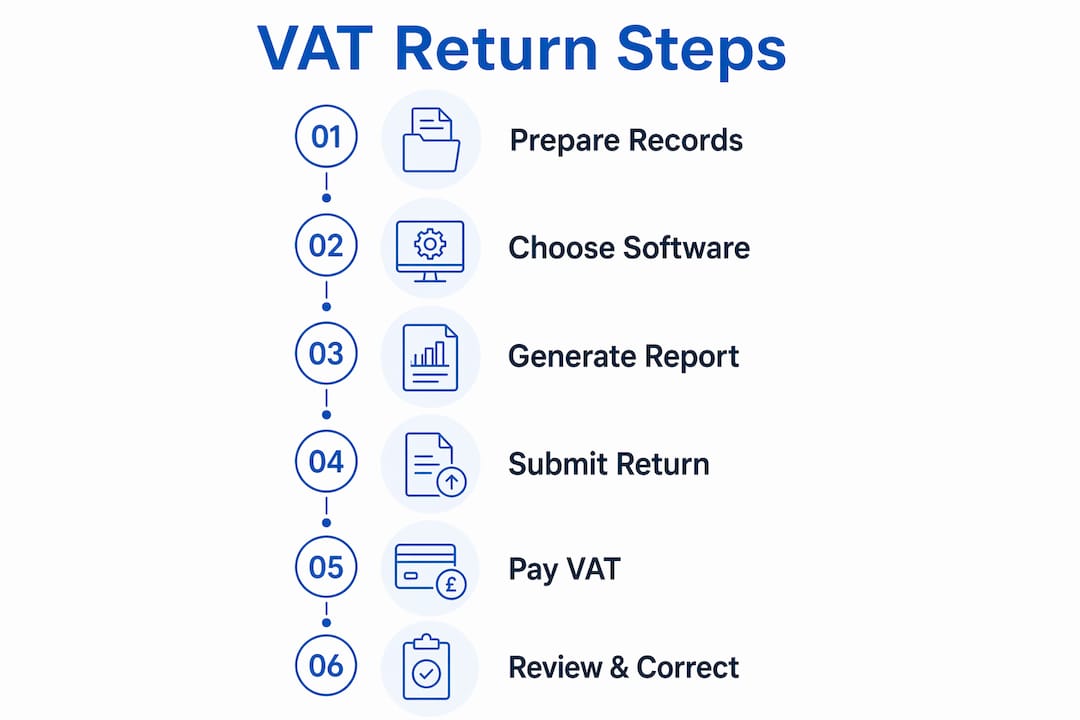
Once your records are complete and reconciled, the actual filing process follows a clear sequence. The VAT return uses Form VAT 100, which contains nine boxes representing your key VAT figures. MTD software populates these boxes automatically from your digital records, which is why clean bookkeeping matters so much.
- Generate your VAT report. Open your MTD software and run the VAT return report for the relevant period. The software pulls figures from your categorised transactions and fills in the nine boxes on Form VAT 100.
- Review Box 1 (output VAT). This is the total VAT you have charged customers on taxable sales. Cross-check it against your sales invoices for the period. Any discrepancy signals a missing invoice or a miscategorised transaction.
- Review Box 4 (input VAT). This is the VAT you are reclaiming on business purchases. Verify that every figure is supported by a valid VAT invoice and that no personal expenses have been included.
- Check Boxes 6 to 9 (totals). These boxes show your total sales and purchases excluding VAT. Box 6 is net sales, Box 7 is net purchases, Box 8 covers goods supplied to EU countries, and Box 9 covers goods acquired from EU countries. For most UK small businesses post-Brexit, Boxes 8 and 9 will be zero.
- Identify and correct errors before submitting. If you spot a discrepancy, trace it back to the source transaction in your software. Correct the categorisation, then re-run the VAT report. Small errors under the de minimis threshold can sometimes be corrected on the next return rather than requiring a separate amendment.
- Submit the return digitally. Once you are satisfied the figures are correct, click submit within your MTD software. The software sends the return directly to HMRC and generates a submission confirmation. Save that confirmation as part of your digital audit trail.
- Record the VAT liability. Note the amount in Box 5, which is the net VAT you owe (or are owed). This figure drives your payment.
Pro Tip: Run your VAT report a week before the deadline, not on the day. That buffer gives you time to investigate any unexpected figures without the pressure of a looming cutoff.
Understanding MTD digital obligations helps you appreciate why the software-first approach is not optional. It is a legal requirement, and it also makes the filing process faster and more reliable than any manual method.
When and how do you pay HMRC the VAT you owe?
Submitting your return is only half the job. You must also pay any VAT owed by the same deadline. The payment deadline is 1 calendar month and 7 days after the end of your VAT period. For a quarter ending 31 march, payment is due by 7 may.
HMRC accepts payment by several methods:
- Direct Debit set up through your HMRC online account (payment is taken automatically on the due date)
- Bank transfer using HMRC’s sort code and account number
- Debit or corporate credit card via the HMRC online payment portal
- Software-integrated payment where your MTD platform connects directly to HMRC
“Setting up a Direct Debit for VAT payments with HMRC eliminates the risk of missing payment deadlines and removes a recurring source of stress for small business owners.”
Direct Debit is the method most professional accountants recommend. Once it is in place, HMRC collects the correct amount automatically on the due date. You do not need to remember to make a payment or calculate the transfer amount manually.
Pro Tip: Set up your VAT Direct Debit at least three working days before your first payment deadline. HMRC needs time to process the instruction before it can collect.
What happens if you cannot pay on time?
If cash flow is tight, contact HMRC before the deadline rather than after. HMRC offers Time to Pay arrangements for businesses that cannot settle their VAT bill in full. A payment plan does not remove the liability, but it does prevent the escalating consequences of ignoring the debt. Late filings and payments trigger a points-based penalty system. Accumulating four penalty points as a quarterly filer results in a £200 fine. Points reset after a sustained period of compliance, so getting back on track matters.
What are the most common VAT filing mistakes and how do you fix them?
Most VAT errors trace back to bookkeeping problems, not the submission process itself. With up-to-date bookkeeping and monthly reconciliations, the VAT submission process typically takes less than 15 minutes of review time. When it takes hours, the bookkeeping is the problem.
The most frequent issues small business owners encounter are:
- Uncategorised transactions. Bank feed items left as “uncategorised” distort both output and input VAT figures. Review your bank feed weekly rather than leaving it until quarter end.
- Missing purchase invoices. Reclaiming input VAT without a valid invoice is non-compliant. Use your software’s receipt capture feature or a dedicated app to photograph receipts immediately after purchase.
- Mixing personal and business expenses. Any personal spend coded to a business account inflates your input VAT claim and creates audit risk. Keep business and personal finances in separate accounts.
- Incorrect VAT rates applied. Applying the standard 20% rate to zero-rated or exempt supplies overstates your output VAT. Check the VAT treatment of each product or service category you sell.
- Forgetting nil returns. A VAT return must be submitted even if your business has made no sales or purchases in the period. MTD software makes nil return submission straightforward: enter zeros in the relevant boxes and submit.
Pro Tip: Schedule a 30-minute monthly bookkeeping review in your calendar. Catching errors monthly means you correct one month of data, not three months of compounded mistakes at quarter end.
For a broader view of how VAT fits into your overall tax compliance workflow, treating VAT as part of a monthly financial routine rather than a quarterly event is the single most effective habit change you can make. Understanding your VAT responsibilities from the outset also prevents the most expensive mistakes.
Key takeaways
Accurate VAT return management requires MTD-compliant software, clean monthly bookkeeping, and payment within 1 calendar month and 7 days of your VAT period end.
PointDetailsMTD software is mandatoryAll VAT-registered businesses must use MTD-compliant software to file returns since april 2022.Clean records cut filing timeMonthly reconciliations reduce VAT submission to a quick review rather than a quarterly scramble.Payment deadline is fixedPay HMRC within 1 month and 7 days of your VAT period end to avoid penalty points.Direct Debit prevents missed paymentsSetting up Direct Debit with HMRC automates payment and removes the risk of forgetting.Nil returns are still requiredSubmit a return even in periods with no sales or purchases, using zeros in the relevant boxes.
VAT returns are simpler than most small business owners expect
My honest view, after working with small UK businesses across a range of sectors, is that VAT returns cause far more anxiety than they deserve. The process itself is genuinely straightforward once your bookkeeping is current. The businesses I see struggling with VAT are almost always struggling with bookkeeping first. The return is just a symptom.
The single change that makes the biggest difference is moving from quarterly bookkeeping to monthly bookkeeping. When you reconcile your accounts every month, the VAT quarter closes itself. You run the report, check the nine boxes, and submit. The whole thing takes minutes, not hours.
I also feel strongly about Direct Debit. I have seen business owners pay penalty points simply because they forgot to make a bank transfer on the right day. Direct Debit removes that entirely. It costs nothing to set up and saves real money over time.
Choosing the right MTD software matters too, but not in the way people think. The best software for your business is the one your team will actually use consistently, not the one with the most features. A well-used basic platform beats an underused advanced one every time.
VAT compliance is not a burden separate from running your business. It is a routine part of financial management, and when you treat it that way, it stops feeling like a problem.
— Rahamut
How Priceandaccountants supports your VAT compliance
Managing VAT returns accurately takes time, attention to detail, and the right systems in place. Priceandaccountants works with small UK businesses to handle exactly this: from setting up MTD-compliant bookkeeping services that keep your records current every month, to reviewing your VAT figures before submission and advising on input VAT eligibility.

Understanding your accounting period and how it aligns with your VAT quarters is a practical starting point. Priceandaccountants offers VAT compliance services tailored to growing businesses, covering digital record-keeping, return preparation, and payment planning. If you want VAT to become a routine rather than a recurring stress, speak to the team at Priceandaccountants.
FAQ
What is a VAT return and who must file one?
A VAT return is a quarterly report submitted to HMRC showing the VAT you have charged and the VAT you have paid. Every VAT-registered business in the UK must file one, even if no transactions occurred in the period.
When is the VAT return deadline?
The deadline for both submission and payment is 1 calendar month and 7 days after the end of your VAT period. For a quarter ending 31 march, the deadline is 7 may.
What happens if I miss a VAT return deadline?
Late submissions add penalty points to your account. Quarterly filers who accumulate four points receive a £200 fine, with further penalties possible for continued non-compliance.
Do I need to submit a VAT return if I had no sales?
Yes. A nil return must be submitted even if your business had no sales or purchases in the period. MTD software makes this straightforward by allowing you to enter zeros and submit directly to HMRC.
How do I correct an error on a submitted VAT return?
Small errors below HMRC’s de minimis threshold can be corrected on your next VAT return. Larger errors require a separate VAT652 form submitted directly to HMRC. Your MTD software or a professional accountant can guide you through the correction process.