
TL;DR:
- Cloud accounting provides real-time visibility and seamless collaboration for UK startups.
- Proper setup and ongoing review are essential to maximize cloud accounting benefits and ensure compliance.
- Expert support helps startups implement and maintain an effective, secure, and scalable financial system.
Running a tech or fintech startup in the UK means making fast, high-stakes decisions. When your financial data lives in a tangle of spreadsheets, emailed invoices, and manually reconciled bank statements, those decisions become guesses. Cloud accounting changes that entirely. It gives you real-time visibility, seamless collaboration with your accountant, and a compliance-ready foundation from day one. This guide walks through every stage of implementation, from the case for switching to securing your system, so you can build a financial operation that scales with your ambitions.
Table of Contents
- Why implement cloud accounting?
- Preparing for cloud accounting implementation
- Step-by-step: Implementing your cloud accounting system
- Cloud accounting security and compliance essentials
- What most guides miss about cloud accounting success
- Accelerate your accounting setup with expert support
- Frequently asked questions
Key Takeaways
PointDetailsCloud vs traditional comparisonCloud accounting offers greater accessibility, scalability, and real-time insights than traditional systems.Platform selection mattersChoosing the right cloud platform and preparing your data up front are crucial for seamless implementation.Security is essentialProper role access, multi-factor authentication, and offboarding policies protect sensitive startup data.Step-by-step executionFollowing a structured, evidence-based rollout minimises disruption and ensures a complete, compliant setup.Ongoing optimisationSuccess demands regular review and cultural adoption, not simply technical installation.
Why implement cloud accounting?
The honest truth is that spreadsheets were never designed for running a business. They break, they conflict, and they tell you what happened last month rather than what is happening right now. For a tech or fintech startup juggling investor expectations, HMRC deadlines, and rapid product iteration, that lag is costly.
Cloud accounting platforms like Xero and QuickBooks Online were built to solve this. They sit in your browser, update automatically, and pull live data from your bank feeds. The contrast with traditional desktop software is stark.
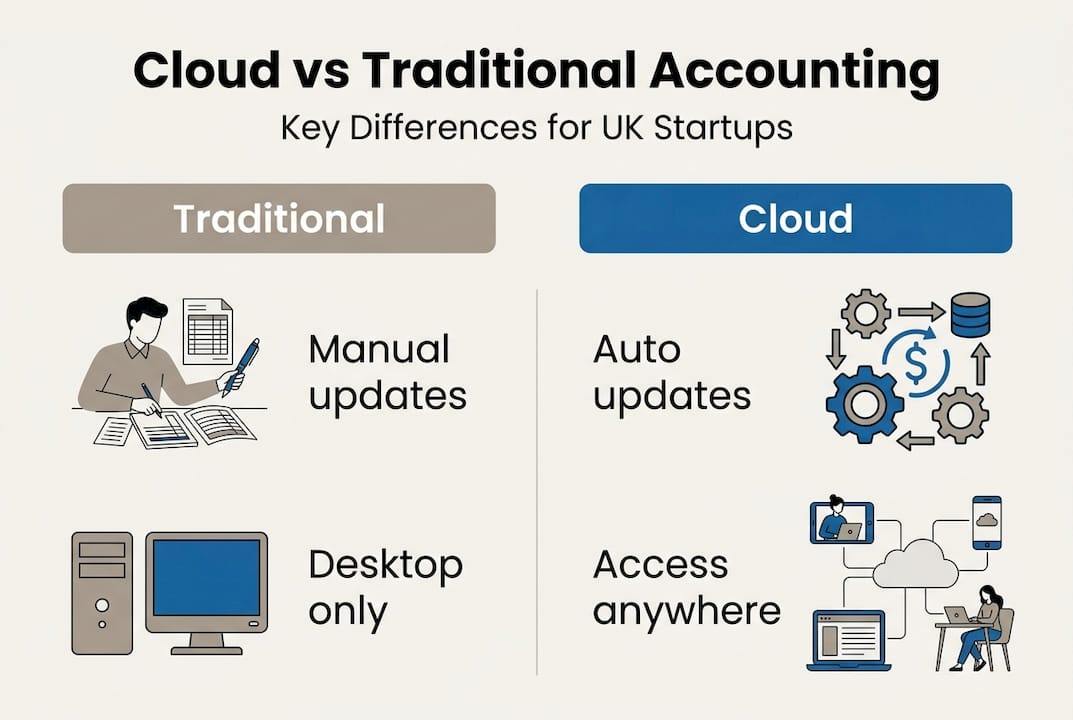
FeatureTraditional accountingCloud accountingInstallation requiredYesNoSoftware updatesManual, infrequentAutomatic, continuousData accessSingle deviceAnywhere, any deviceCollaborationFile-sharing workaroundsReal-time, multi-userData backupManual or IT-managedAutomatic, encryptedCost modelLarge upfront licenceMonthly subscriptionScalabilityLimited, costly upgradesImmediate, flexibleIntegrationsMinimal1,000+ apps
According to Xero’s guidance for small businesses, the shift to cloud delivers no-install access, automatic updates, anywhere connectivity, real-time collaboration, automated backups, subscription-based pricing, and wide-ranging integrations. For a startup team where the founder might be in a Shoreditch café while their bookkeeper is remote, this is not a luxury. It is the baseline.
The key cloud accounting benefits for UK tech and fintech businesses include:
- Real-time financial visibility so you can spot cash flow problems before they become crises
- Multi-user access allowing founders, finance leads, and accountants to work simultaneously without version conflicts
- Direct bank feed connections to neobanks like Monzo and Revolut, which are popular in the fintech sector
- Making Tax Digital (MTD) compliance built into leading platforms, removing the manual burden of VAT submissions
- App ecosystem integrations connecting payroll, CRM, expense management, and payment platforms in a unified stack
Understanding why cloud accounting matters goes beyond convenience. Time is the most significant saving. Finance teams at fast-growth startups report reclaiming hours per week previously spent on manual reconciliation, chasing invoices, and re-entering data across systems. Those hours go back into building the business. The ROI on a £30 to £60 per month subscription is almost always positive within the first quarter.
Pro Tip: Before you even compare platforms, calculate the hours your team currently spends on manual finance tasks each month. Multiply by your average hourly cost. That figure is your baseline for measuring ROI from day one.
For the founders we work with at Price & Accountants, the connection between cloud accounting adoption and investor readiness is direct. Clean, real-time financials are what accountants and startup growth advisors need to present accurate management accounts to investors at Series A. If your numbers are scattered across three spreadsheets and a desktop file, you will feel it in due diligence.
Preparing for cloud accounting implementation
The most common mistake startups make is jumping straight into platform setup without doing the groundwork first. A poorly configured cloud accounting system can be just as confusing as a spreadsheet. Good preparation takes a few days but saves months of backtracking.

Start by mapping your requirements. Identify who will access the system, what roles they need, and which core processes the platform must handle. At a minimum, you need clarity on invoicing workflows, expense capture, payroll, VAT obligations, and any multi-currency requirements if you are transacting internationally.
Then choose your platform. For most UK tech and fintech startups, the decision comes down to Xero versus QuickBooks Online. Here is a practical comparison:
CriteriaXeroQuickBooks OnlineMTD VAT complianceNative, HMRC-approvedYesUK bank feeds (Monzo, Revolut, HSBC)ExcellentGoodAccountant ecosystem in UKVery strongModerateApp integrations1,000+750+Multi-currencyYes (Premium plan)YesInventory managementBasicStrongUS/global operationsLimitedBetter suitedPricing (entry level)£16/month£14/month
Xero is the most recommended platform for UK tech and fintech SMEs because of its HMRC MTD compliance, strong UK bank feeds including Monzo and Revolut, a 1,000+ app ecosystem, and seamless accountant collaboration tools. QuickBooks Online is better suited to businesses with complex inventory needs or significant US-facing operations.
Your preparation checklist before going live should include:
- Clean up historical data: archive old transactions, reconcile outstanding items, and close off any messy periods
- Align stakeholders: brief your team on the transition timeline, new workflows, and training expectations
- Review your chart of accounts: this is the backbone of your reporting and must reflect your actual business model
- Confirm payroll arrangements: decide whether payroll runs inside the platform or integrates via a third-party tool
- Check bank and payment platform compatibility: verify your bank supports direct feeds
- Review GDPR data handling: understand how your chosen vendor stores and processes financial data
Working with a qualified Xero bookkeeper at this stage pays dividends. The chart of accounts, in particular, is something many founders overlook. It determines whether your P&L gives you meaningful segment reporting or a meaningless blob of revenue and costs. Getting it right from the start is far easier than reformatting it twelve months later when you are preparing for a funding round.
Pro Tip: Involve your accountant before you set up a single account. Ask them to review your proposed chart of accounts and VAT settings before going live. Bookkeeping best practices start at the architecture stage, not after the first reconciliation.
Step-by-step: Implementing your cloud accounting system
With your preparation complete, you are ready to build. The following sequence is based on Xero’s 12-step implementation process for UK SMEs, which covers every critical configuration point from initial setup through to your first week of live operation. The same logic applies if you are using another platform.
- Create your account. Sign up and choose the subscription plan that matches your current needs. You can upgrade as you scale.
- Enter business details. Add your registered company name, Companies House number, registered address, and financial year start date. These details flow through to invoices and HMRC submissions.
- Configure your chart of accounts. Adapt the default chart to reflect your actual revenue streams, cost categories, and balance sheet items. For a SaaS startup, this might mean separate nominal codes for subscription revenue, professional services, and cloud infrastructure costs.
- Connect your bank feeds. Link your business bank accounts directly. Most UK banks and neobanks support automated feeds. This removes manual statement imports and enables daily reconciliation.
- Set up invoice templates. Customise your invoice layout with your logo, payment terms, and bank details. Set up automated payment reminders to reduce debtor days.
- Enter opening balances. Import your trial balance from the date you go live. This ensures your cloud accounts are reconcilable to prior periods and gives investors a continuous financial picture.
- Configure VAT settings. Set your VAT scheme (standard, flat rate, or cash accounting), your VAT registration number, and your MTD submission preferences. This step is critical and must be done accurately.
VAT misconfiguration is one of the most common and most costly mistakes in cloud accounting setup. An incorrect VAT scheme or the wrong tax date setting can result in erroneous HMRC submissions. Always verify your VAT settings with a qualified accountant before your first return.
- Set up payroll. Either activate the platform’s native payroll module or connect your existing payroll provider via integration. Confirm RTI (Real Time Information) submissions are correctly configured for HMRC.
- Upload key documents. Store copies of your incorporation documents, VAT registration certificate, and any PAYE references within the platform or linked document management system.
- Configure automation rules. Set up bank rules to auto-categorise recurring transactions. This is where cloud accounting really earns its keep, turning a daily reconciliation task into a two-minute review.
- Set user permissions. Assign roles based on the principle of least privilege. Your bookkeeper needs different access to your read-only investor.
- Complete your first-week checklist. Reconcile your opening bank balance, process any outstanding invoices, run a test VAT report, and confirm your accountant has advisor-level access.
Throughout this process, work closely with your chosen accounting companies or advisory team. Setup errors caught in week one cost minutes to fix. The same errors discovered at year-end cost significantly more.
Pro Tip: Document every configuration decision as you go. Record why you chose a particular VAT scheme, which bank rules you created, and who has which permissions. This documentation is invaluable when onboarding new finance staff or switching accountants.
Cloud accounting security and compliance essentials
A cloud accounting system holds some of your most sensitive business data: bank details, payroll records, client invoices, and tax submissions. Security is not optional. It is a board-level responsibility.
The most important security measures for cloud accounting include:
- Role-based access control: assign owner, standard, and read-only permissions based on actual job function
- Multi-factor authentication (MFA): enforce this for every user without exception, not just admins
- Approved device policies: consider restricting access to company-managed devices, particularly for users with payment or admin rights
- Activity logging and alerts: enable notifications for admin changes, new user additions, bank feed amendments, and payment runs
- Dual approval for payments: require two-person sign-off for any bank payment or new vendor addition above a defined threshold
- Offboarding procedures: immediately revoke access when any team member, contractor, or advisor leaves the business
- Data retention policies: understand how long your vendor retains data and what your obligations are under GDPR
Human error and weak access controls account for the majority of preventable financial data breaches in small businesses. Most incidents are not sophisticated attacks; they are former employees with live logins or phishing emails targeting admin users without MFA enabled.
Your compliance obligations extend beyond the platform itself. Under GDPR, you are responsible for the personal data your cloud accounting system processes, including employee and client details. Confirm your vendor’s data processing agreement (DPA), understand where data is stored geographically, and ensure your internal accounting policies reflect these requirements.
For MTD compliance, your cloud platform must be HMRC-recognised and capable of digital record-keeping and VAT submission. Xero and QuickBooks Online both meet this standard for VAT-registered businesses, but you should verify the status of any third-party bridging software if you use it. The role of accountants in maintaining ongoing compliance cannot be overstated; a quarterly review with your advisor catches configuration drift before it becomes a regulatory issue. Your team should also be familiar with bookkeeping best practices to support daily financial hygiene.
What most guides miss about cloud accounting success
Most implementation guides treat cloud accounting as a one-time project. Configure it, go live, and move on. In our experience supporting startups from pre-seed through to Series A, that approach is exactly why so many companies end up with clean-looking platforms that deliver misleading reports six months later.
The startups that truly benefit from cloud accounting treat it as a living system. They schedule a monthly or quarterly review of their chart of accounts to ensure it still reflects the business model. They audit their automation rules when new revenue streams or cost categories emerge. They revisit user permissions every time someone joins or leaves the team.
Why cloud accounting matters is not just a question of setup. It is a question of ongoing cultural adoption. The most sophisticated Xero configuration in the world delivers nothing if the team does not use it consistently. Regular, brief training sessions, clear internal policies on receipt capture and expense coding, and a monthly finance review ritual make far more difference than any additional software feature.
Our honest advice to founders: stop treating your accounting system as an administrative burden and start treating it as a business intelligence tool. The data is already there. With the right configuration and a regular review rhythm, cloud accounting gives you the kind of financial clarity that used to require a full-time Finance Director.
Accelerate your accounting setup with expert support
Getting cloud accounting right from the start saves significant time, money, and stress as your startup scales. At Price & Accountants, we work with UK tech and fintech founders at every stage, from initial platform selection and configuration through to ongoing bookkeeping services and strategic financial oversight.

Whether you need hands-on Xero setup, a review of your existing configuration, or a broader financial strategy that includes R&D tax credits and investment readiness, our team brings over 40 years of expertise to every engagement. We have helped more than 20 startups build the financial foundations needed to reach valuations well above £50m. If you are ready to implement cloud accounting properly or want to make sure your current setup is genuinely working for your business, get in touch with our team today.
Frequently asked questions
How long does cloud accounting implementation usually take?
Most UK tech startups can complete core cloud accounting setup in one to two weeks, covering platform configuration, chart of accounts setup, bank feed connections, and data import, based on Xero’s 12-step implementation process for UK SMEs.
Is cloud accounting secure enough for sensitive financial data?
Yes, provided you enforce role-based access and MFA consistently, maintain strict offboarding procedures, and use only HMRC-recognised, GDPR-compliant platforms with audited security standards.
Which cloud accounting platform suits UK fintech startups best?
Xero is highly recommended for UK compliance due to its MTD compliance and strong bank feeds with Monzo, Revolut, and HSBC, while QuickBooks Online suits businesses with complex inventory management or significant US operations.
Do I need to change my business bank account to use cloud accounting?
No, most UK cloud accounting platforms integrate with all major banks, but you should verify feed and automation compatibility with your specific bank, particularly for neobanks, to ensure real-time transaction data flows correctly.
Recommended
- Streamline company accounts in the UK: A guide for tech startups - Price & Accountants
- Bookkeeping best practices for UK tech startups: 2026 guide - Price & Accountants
- Accounting due diligence for UK tech startups: A founder’s guide - Price & Accountants
- Essential accounting tips for UK tech startups scaling to Series A - Price & Accountants